
01Check the source
Check the explanation against your PDF.
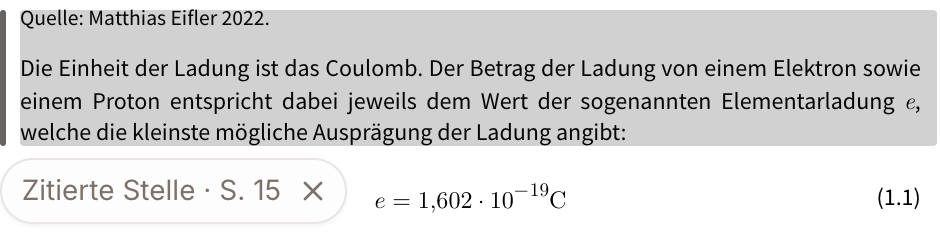
The citation leads to the highlighted passage in your PDF. Compare it with the explanation and check whether they match.
 Enlarge this view
Turn your course material into explanations, written practice, and flashcards you can return to.
Create a free account, then upload your PDF. No credit card required.
A look inside EducateAI


Used by students at
Learning with your own course material
This physics example from EducateAI shows three moments in the learning flow. Take a closer look at each one.
01Check the source
The citation leads to the highlighted passage in your PDF. Compare it with the explanation and check whether they match.
Enlarge this view02Answer for yourself
The tutor asks a transfer question. You apply the connection yourself instead of only reading the explanation.
 Enlarge this view
03Return for review
After the learning session, you can see when a review is planned. Recalling it later without help lets you check what you have retained.
 Enlarge this view
Check explanations against your course material, then practice in your own words with AI feedback.
Illustrated example · not an app recording
The speed stays the same, but the direction changes. Velocity has both magnitude and direction. That is why the car accelerates around the bend.
Check the source
Acceleration is the rate of change of velocity. Velocity is a vector: it has both magnitude and direction. When a vehicle goes around a bend at constant speed, the direction of its velocity changes. It is therefore accelerating.
 Open the complete sample material
Sample material: acceleration around a bend
Another attempt in the example
A bicycle travels in a circle at constant speed. What changes about its velocity?
FOUR STUDY TASKS
Check a source, write an answer, plan a session, or review a card in EducateAI.
Ask a question about your PDF, then open the linked passage to check the explanation against your material.
Answer a flashcard in your own words. Use AI feedback to check which points may be missing, then try again.
Choose your course material, exam date, and daily study time to create a study plan.
Create flashcards from your material. Spaced repetition schedules later reviews so you can practice the answers again.
PRICING
Start free. Choose more capacity when you need it.
€0/mo
Start with your own material: explanations, flashcards, written-answer feedback, and due reviews.
Compare plans€8/mo
For more material and practice: more PDFs per chat, more AI usage, exports, and additional models.
Compare plans€29/mo
High-volume study workflows with all models, image uploads, and the highest usage tier.
Compare plansAll prices in EUR. Taxes may apply.
FAQ
What the product does, how it uses your material, and what to expect before you start.
For questions about your material, linked passages help you verify the answer. General examples can supplement an explanation; they are not quotations from your PDFs. Check important claims against the cited sources and your course material.
You can ask questions about your material, create flashcards, and review them without opening a different application for each step.
Linked passages show what your material supports. If the available material does not provide enough evidence, check the sources, upload additional material, rephrase your question, or choose a different file.
EducateAI supports preparation with explanations, practice, and feedback. Practice results show what went well on those tasks. They do not guarantee complete exam coverage or a particular grade.
EducateAI is designed for studying and practice — understanding concepts, testing yourself, preparing for exams. For graded work, always follow your course rules on AI use. If your course allows AI-assisted preparation, we recommend documenting how you used it.
Your uploads support your own study sessions, including document-based explanations, linked passages, study plans, and flashcards. Storage and processing details are covered in the privacy policy linked in the footer. Only upload material you are allowed to use and avoid documents containing other people’s personal data.
Yes. The free plan includes 1 PDF per chat, 3 chats per month, starter monthly AI and voice usage, and full access to flashcard generation and spaced repetition. No credit card required. Upgrade anytime if you need more capacity.
EducateAI supports PDF files. On the free plan, files can be up to 5 MB. Pro supports up to 100 MB and includes OCR for scanned documents. Max supports up to 500 MB per file, including image upload. You can upload multiple files into a single conversation on Pro and Max plans.
Upload your material, explore a question, and check your understanding with an answer of your own.
Start with my course materialCreate a free account, then upload your PDF. No credit card required.